Free Café Billing Software for Coffee Shops
Move from a cappuccino at the counter to a seated snack order without recreating your catalogue for every channel.
Free core billing. Connected customer ordering and restaurant modules depend on configuration.
What slows down a café & coffee shop?
A café menu combines coffees, add-on snacks and table orders. Rushes become difficult when the cashier and barista lose track of which order is ready.
Free Restaurant Billing keeps the merchant in control of item rates, applicable taxes, order acceptance, and final checkout. Configure only the channels your outlet needs.
How to get started
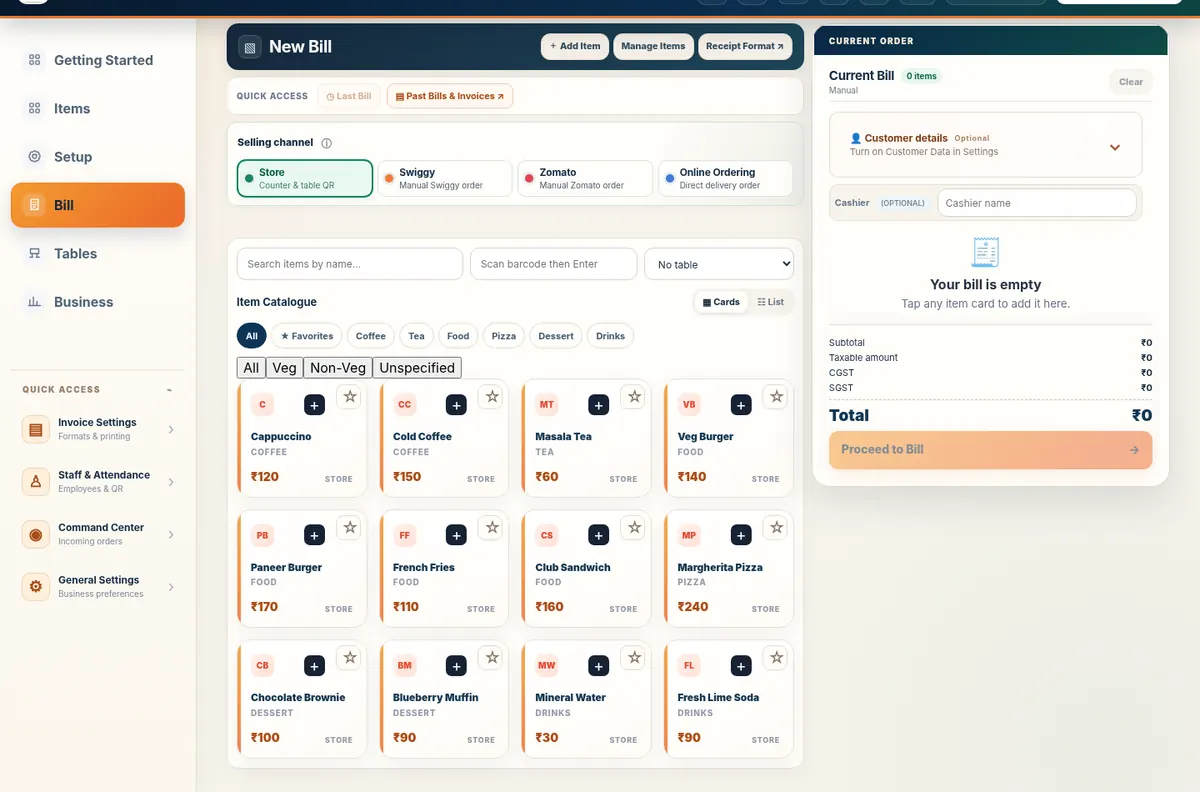
- Set up drinks, bakery items and café snacks with selling prices appropriate to your outlet.
- Use fast counter billing for takeaway; enable a table workflow only for cafés with seating.
- Check prep requests and settle each order with the right invoice and payment record.
Follow the real product workflow
These are real demo screens, not fabricated customer results. The available actions vary with the selected food-business configuration.
Questions café & coffee shop owners ask
Can a café work without table QR?
Yes. Regular counter billing can be used without setting up QR ordering.
Can I change café item prices?
Yes. Selling prices and applicable channels are maintained in the normal item catalogue.
Can staff monitor preparation?
KDS can show supported accepted preparation tickets when configured for the café.
Related restaurant operations
Set up your food business with Free Restaurant Billing
Begin with free core billing, review your item rates, and add the connected workflows your outlet needs.
Start Free Billing Explore the demoPractical next steps
Built for café counter speed, not generic invoicing
A café may switch constantly between takeaway, quick counter orders and seated snacks. Keep one menu catalogue while using the billing and restaurant-operation tools that fit each service style. Start with core billing free, then configure kitchen or QR workflows only if the café needs them.